Ever wish your phone could turn off Wi-Fi, Bluetooth, or location when you lock it and turn them back on when you unlock it? That’s exactly what Privacy Flip does. It’s a smart little app that helps you protect your privacy without lifting a finger.
Whether you’re using a rooted phone or not, Privacy Flip works quietly in the background to manage your device’s privacy settings based on your screen lock and unlock.
Let’s explore how it works, how to set it up, and why it’s a must-have for privacy-conscious Android users.
Table of Contents
What Is Privacy Flip?
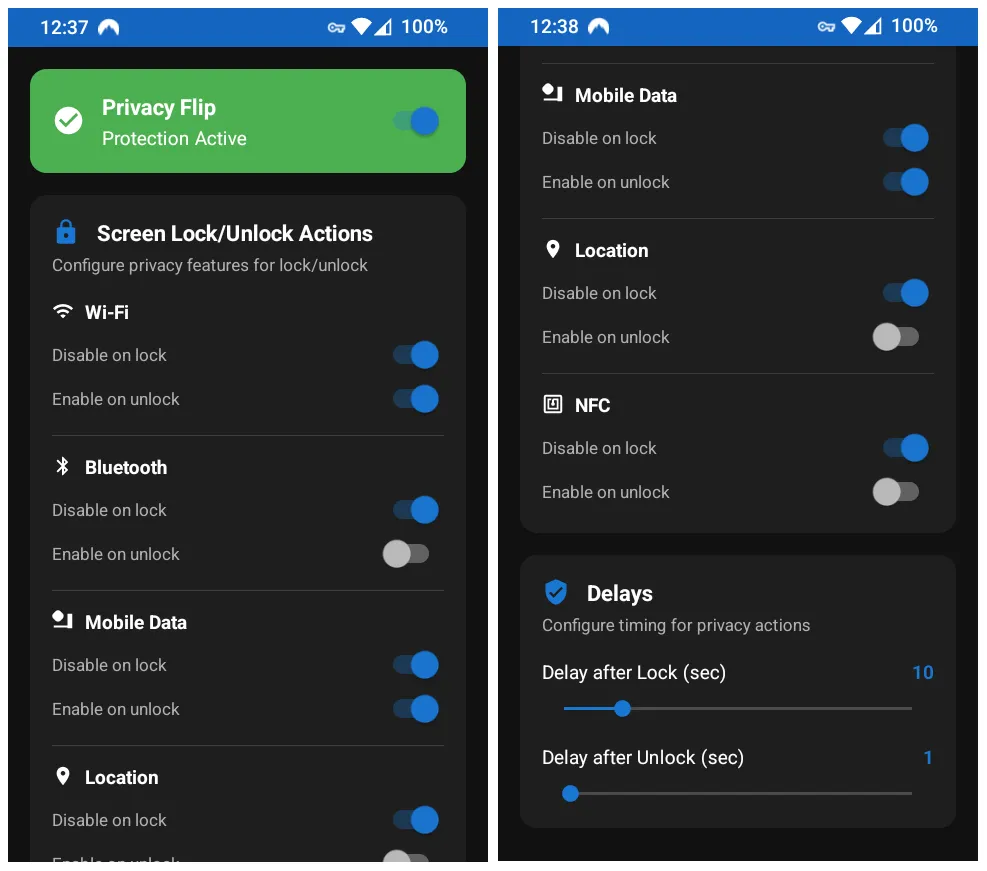
Privacy Flip is an Android app that automatically turns off certain features when you lock your screen and turns them back on when you unlock it. You can choose which features to control, like:
- Wi-Fi
- Bluetooth
- Mobile Data
- Location Services
- NFC
- Camera (Android 12+)
- Microphone (Android 12+)
It’s super customizable and works with both rooted and non-rooted phones using something called Shizuku (don’t worry, we’ll explain that too).
Key Features
- Automatically manage privacy settings when you lock/unlock your phone
- Works with Root, Shizuku (no root), or Sui (best combo)
- Choose which features to control
- Set delay timers (0–60 seconds)
- Runs quietly in the background
- Quick Settings tile for easy access
- Clean and simple user interface
- No internet access your data stays on your device
Requirements
| Feature | What You Need |
|---|---|
| Basic use | Android 7.0 or higher |
| Camera/Mic control | Android 12 or higher |
| Root method | Magisk, SuperSU, etc. |
| Shizuku method | Shizuku app + ADB (USB or wireless) |
| Sui method | Magisk + Sui module |
How to Use Privacy Flip
For Root Users:
- Install Privacy Flip (link below).
- Open the app and allow root access.
- Choose which features to disable/enable.
- Set delay timers if you want.
- Done! The app works automatically in the background.
For Shizuku Users (No Root Needed):
- Install the Shizuku app and start it (via USB or wireless debugging).
- Open Privacy Flip and grant Shizuku permission.
- Choose your privacy settings.
- Set delay timers if needed.
- That’s it! It runs quietly in the background.
For Sui Users (Best Experience):
- Make sure your device is rooted with Magisk.
- Install the Sui module.
- Open Privacy Flip it’ll detect everything automatically.
- Set your preferences and enjoy!
Download Privacy Flip
You can download Privacy Flip from the official source:
Tips to Get the Most Out of Privacy Flip
- Use delay timers to avoid conflicts with instant locking
- Try Shizuku if you don’t want to root your phone
- Use Quick Settings tile for fast access
- Check logs if something isn’t working right
- Keep your device updated for best compatibility
Check this also: 20 best free Open-Source Android Apps
FAQs
Nope! Everything stays on your device. No internet access, no tracking.
Yes! Just use the Shizuku method.
Camera/mic controls may not work. The app will warn you if needed.
Absolutely. It’s open-source and doesn’t collect any personal data.
Final Thoughts
Privacy Flip is a simple but powerful tool to help you stay in control of your phone’s privacy. Whether you’re a tech geek or just someone who wants more peace of mind, this app makes it easy. Try it out, and let your phone work smarter for you.
If you found this guide helpful, drop a comment below and share your experience!
