Flashing firmware on Samsung devices used to require a PC, cables, and the Odin tool. But now, with the Eros Samsung Flasher app, you can do it all from your Android phone or TV using just an OTG cable. No root access needed, and it works with most Samsung phones and tablets!
Table of Contents
What Is Eros Samsung Flasher?
Eros is a lightweight Android app that lets you flash official Samsung firmware directly to your device using an OTG connection. It’s designed for simplicity and works without needing a computer or root access. Whether your device is stuck in a bootloop or you want to reinstall stock firmware, Eros makes it easy.
Key Features of Eros
- Flash tar and tar.md5 files: Supports official Samsung firmware formats.
- Reboot to system: Automatically reboots your device after flashing.
- MD5 checksum verification: Ensures firmware integrity before flashing.
- Userdata erase: Wipes and recreates the userdata partition.
- TFlash support: Flash firmware from an SD card (note: SD card will be wiped).
- A/B partition support: Choose which partition to flash on newer devices.
- Auto reboot toggle: Decide whether the device should reboot after flashing.
Requirements to Use Eros
Before you begin, make sure you have:
- An Android phone or Android TV with USB Host API support
- The Eros Samsung Flasher app installed
- A Samsung device that supports Odin3 protocol
- An OTG adapter and USB cable
- A valid Samsung firmware file (.tar or .tar.md5)
- Optional: SD card for TFlash method
How to Use Eros Samsung Flasher (Step-by-Step)
- Download and Install Eros
- Get the app from the official GitHub page or trusted sources.
- Prepare Your Samsung Device
- Boot your Samsung device into Download Mode.
- Connect it to your Android phone using an OTG adapter.
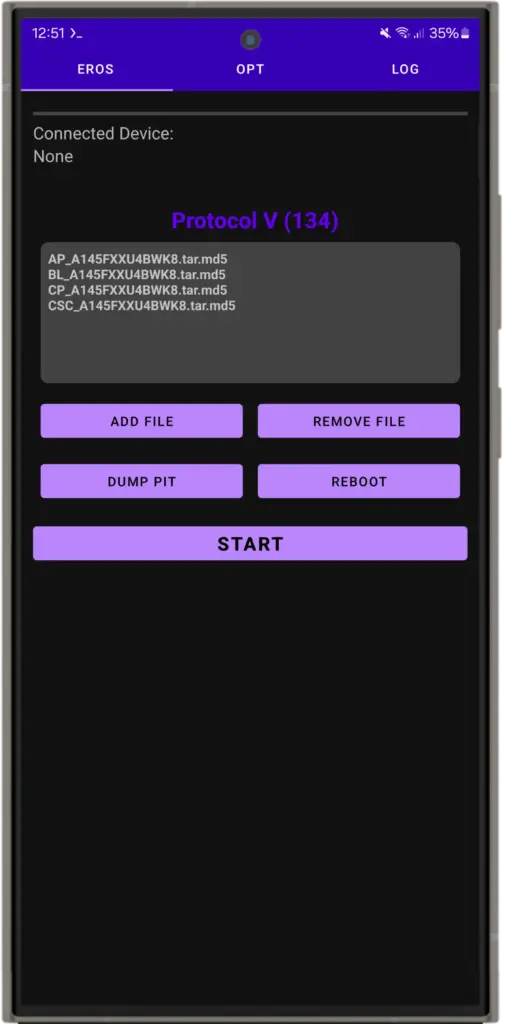
- Launch Eros App
- Open the app on your Android device.
- It will detect the connected Samsung device.
- Load Firmware File
- Tap “Select Firmware” and choose your
.taror.tar.md5file.
- Tap “Select Firmware” and choose your
- Start Flashing
- Tap the “Flash” button.
- Eros will begin installing the firmware.
- Reboot Automatically
- If auto-reboot is enabled, your device will restart once flashing is complete.
Tips for Smooth Flashing
- Always verify the MD5 checksum before flashing.
- Use official firmware files from trusted sources.
- Make sure your OTG adapter and cable are working properly.
- Charge both devices to at least 50% before starting.
- Avoid interrupting the flashing process once it begins.
FAQs
Yes! That’s the main benefit of Eros it works entirely on Android.
No, root is not needed.
Samsung devices using Odin3 protocol, including newer models like A36, A55, and S25.
Yes, but note that the SD card will be wiped during the process.
Final Thoughts
Eros Samsung Flasher is a game-changer for anyone looking to flash Samsung firmware without the hassle of using a PC. It’s fast, simple, and works on a wide range of devices. Whether you’re fixing a bootloop or just updating your firmware, Eros makes the process smooth and stress-free.
If you found this guide helpful, leave a comment below and share your experience with Eros.
