If you have seen the stylish Nothing OS smartphones, you might have noticed their signature wallpaper transition. When you unlock the phone, the wallpaper smooths into view from soft, atmospheric color clouds into a crystal-clear image. For a long time, this beautiful visual effect was exclusive to Nothing OS devices.
That changes with Atmo Engine, an open-source tool originally known as NOSAtmosphereEffect. In this comprehensive blog post, you will learn everything about this customization tool, including what it does, its top features, how to download and install it on your Android phone, step-by-step usage instructions, simple troubleshooting fixes, and answers to common questions.
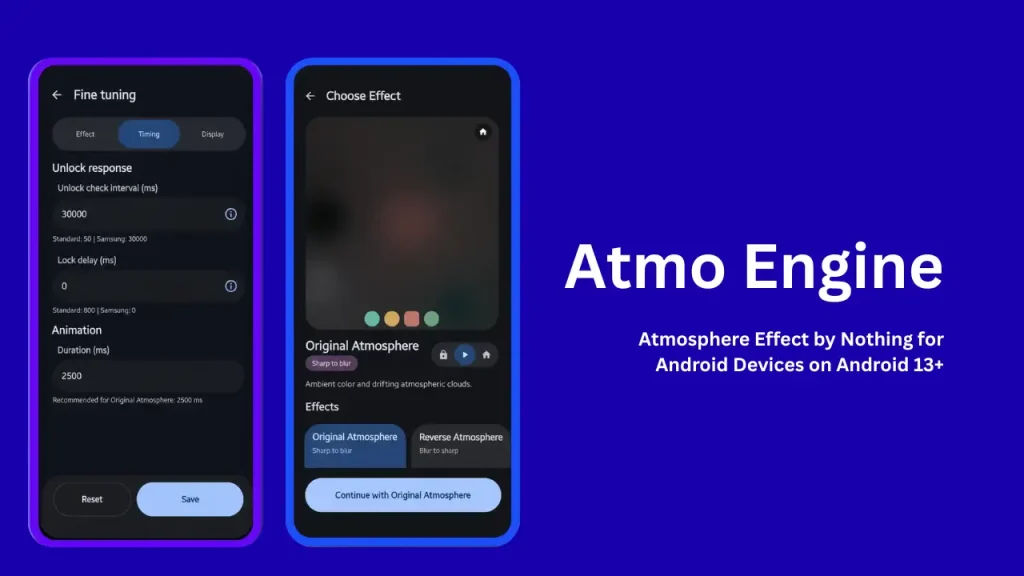
Table of Contents
What is NOS Atmosphere Effect?
NOS Atmosphere Effect, officially named Atmo Engine, is a free and open-source Android live wallpaper app created by independent developer Saad Ullah Khan. It replicates and expands upon the famous “Atmosphere” wallpaper transition found in Nothing OS.
Instead of showing a static image when you unlock your phone, Atmo Engine transforms your lock screen wallpaper into interactive visuals. You can set your phone to transition from soft ambient clouds, frosted glass, or monochrome sketches into a full-color, sharp home screen wallpaper every time you wake up your device. It runs entirely on your device without sending any personal photos or data to external servers.
Features of NOS Atmosphere Effect
Atmo Engine comes packed with features that make your phone look modern and unique while remaining lightweight and private:
- Multiple Transition Styles: Choose from Original Atmosphere, Reverse Atmosphere, Simple Frosted Glass, Reeded Glass Effect, Monochrome Canvas Sketch, Halftone Comic Print, and Color Fill animations.
- AI Subject Isolation: The app can automatically detect people, pets, or main objects in your photos using on-device machine learning. It keeps your main subject crisp while applying the blur or sketch effect only to the background.
- Single and Playlist Modes: Use a single favorite photo, build a rotating playlist of multiple wallpapers, or set separate Light and Dark mode playlists that change automatically when your phone toggles themes.
- Advanced Visual Controls: Fine-tune blur intensity, animation speeds, film grain texture, lock-screen delay, and glass rib thickness to match your personal taste.
- High-Performance Rendering: Supports native Vulkan GPU rendering alongside standard OpenGL ES for smooth animations and battery efficiency.
- Complete Offline Privacy: The app does not request internet access permissions. Your wallpapers and image processing remain 100 percent private on your phone.
- Quick Gallery Sharing: You can share photos directly from your gallery app to Atmo Engine to apply wallpapers instantly without browsing through menus.
Requirements
Before installing Atmo Engine on your smartphone, make sure your device meets these basic requirements:
- Operating System: Android 13 or newer (API Level 33 and higher), including support for Android 14, 15, and 16.
- Permission: Standard wallpaper permission to set live wallpapers on your system.
- Device Compatibility: Works across major Android device skins including Samsung One UI, Google Pixel Stock Android, OnePlus OxygenOS, Xiaomi HyperOS, and custom ROMs.
Download
You can download Atmo Engine from several reliable open-source app distribution channels:
- GitHub Releases: The developer regularly posts the newest direct installation APK files on the official project repository. You will find separate packages designed for Android 13 to 15 as well as Android 16.
Install
Installing the app takes less than two minutes depending on which method you choose:
Method 1: Installing via Store Apps
- Open your preferred app store (such as Google Play or F-Droid).
- Search for Atmo Engine.
- Tap Install and wait for the download to complete.
Method 2: Installing via APK File
- Download the latest APK file from the project releases section.
- Tap the downloaded APK file in your phone downloads manager.
- If prompted, allow your browser or file manager permission to install unknown apps.
- Tap Install and open the app once finished.
How to Use
Follow these simple steps to set up your first Atmosphere wallpaper transition:
- Open the App: Launch Atmo Engine on your Android phone.
- Select an Effect: Browse through the available styles like Original Atmosphere, Reverse Atmosphere, or Canvas Sketch.
- Choose Your Image Mode: Select a single photo from your gallery, or pick multiple photos to create an automatically rotating playlist.
- Fine-Tune the Settings: Customize blur depth, grain intensity, or turn on Subject Isolation to keep people or objects clear in the foreground.
- Apply the Live Wallpaper: Tap the Apply button at the bottom of the screen.
- Set Desktop Destinations: When the Android system live wallpaper preview appears, tap Set Wallpaper and choose Home screen and Lock screen. Setting both screens is mandatory so the app can calculate transition states between unlocking and your home layout.
Credit
- Developer: Saad Ullah Khan (known on GitHub as saad-khan-rind), who created and actively maintains this open-source project.
- Inspiration: Nothing Technology Ltd, the creator of Nothing OS and the original Atmosphere transition visual language.
- License: Distributed freely under the open-source MIT License, allowing anyone to view, modify, and contribute to the source code.
Troubleshoot
If you run into any minor issues while using the app, try these easy solutions:
- Wallpaper Snaps or Flickers on Lock: Open the Fine Tuning menu inside the app, go to Timing, and increase the Lock Delay (Anti-Flicker) slider slightly. This prevents the wallpaper from snapping back before your screen turns off completely.
- Delayed Animation Start: In the Timing settings, lower the Unlock Check Interval value so your phone detects screen unlocks faster.
- Effect Not Working: Make sure you set Atmo Engine as the live wallpaper on both your Lock Screen and Home Screen. If it is only applied to one screen, transitions cannot take place.
- Subject Masking Fails: If you are using the Google Play version, go to Fine Tuning and tap Download subject model to ensure the machine learning assets are ready on your device.
- Performance or Lag: Open Fine Tuning, go to Display, and set the Graphics API from Vulkan to OpenGL ES.
FAQs
Yes, Atmo Engine is 100 percent free and open source with no hidden fees or paywalls.
No. The app relies on efficient GPU rendering engines and remains idle when your screen is off or when you are actively using apps on your phone.
No. The app operates completely offline and does not request internet access permissions. All processing happens on your device.
Yes. You can use the Theme Playlist feature to assign specific light wallpapers for daytime and dark wallpapers when system dark mode turns on.
The app uses modern Android live wallpaper APIs and graphics rendering controls that are only available on Android 13 and later versions.
Conclusion
Atmo Engine brings one of the most aesthetic visual customization features from Nothing OS straight to any modern Android phone. With its privacy-focused design, offline AI subject isolation, customizable animation modes, and open-source transparent code, it is an essential tool for anyone looking to refresh their phone setup. Give it a try on your smartphone today and enjoy smooth, futuristic screen transitions every time you unlock your device.
Have you tried Atmo Engine on your Android phone yet? What is your favorite transition style? Please leave a comment below to share your thoughts, tips, or questions!