If you have ever needed a quick way to restart your Android phone into recovery or bootloader mode, you know how annoying it can be to remember complicated physical key combinations. The situation gets even worse if your phone’s physical power or volume buttons are broken.
In this blog post, we are going to dive deep into RebootNya, a modern, lightweight, and open-source reboot utility for Android. We will cover everything you need to know about this handy tool, including what it is, its core features, hardware requirements, step-by-step instructions for downloading and installing it, how to use it with or without root, troubleshooting common issues, and answers to frequently asked questions.
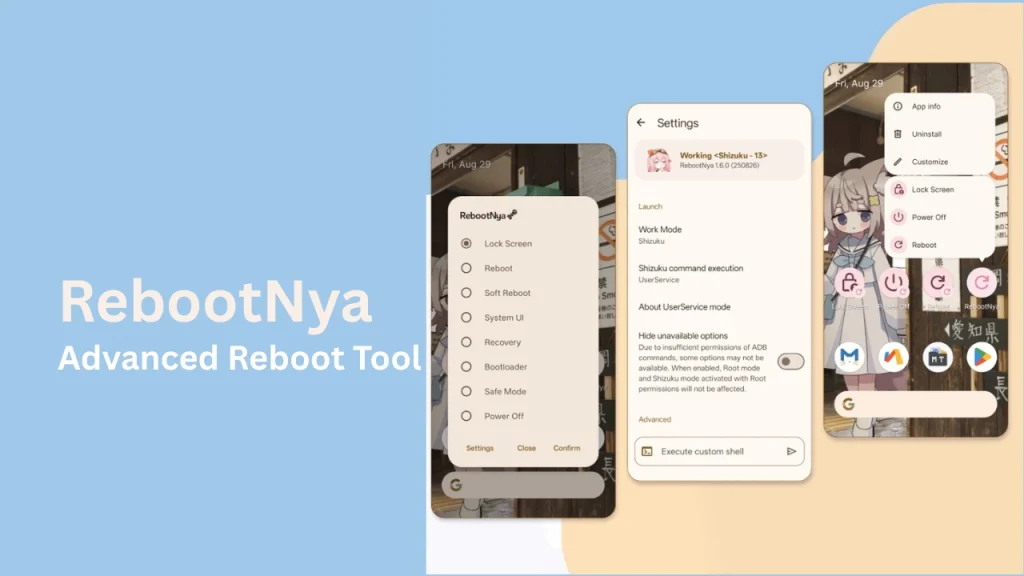
Table of Contents
What is RebootNya?
RebootNya is a simple yet advanced reboot app created for Android devices. The project was created by developer daisukiKaffuChino on GitHub after needing a reliable way to restart a phone that had broken hardware power and volume buttons.
Unlike traditional reboot apps that strictly require root privileges, RebootNya supports both Root access and Shizuku.This means that even non-rooted users can safely trigger elevated system restarts as long as they have Shizuku configured via ADB. The app does not rely on security exploits instead, it executes reboot commands cleanly and transparently through standard Android APIs and system permissions.
Features of RebootNya
RebootNya comes packed with several useful features while maintaining a tiny file size and clean design:
- Multiple Reboot Modes: Easily perform a normal system restart, reboot to recovery mode, or reboot to bootloader/fastboot mode with a single tap.
- Dual Permission Engines: Works seamlessly with Root managers (such as Magisk, KernelSU, or APatch) as well as non-root setups using Shizuku.
- App Shortcuts Support: Access your preferred reboot actions directly from your home screen or app drawer using native launcher shortcuts.
- Intent-Based Automation: Supports sending external intents, allowing you to trigger or close the app programmatically using automation tools like Tasker or MacroDroid.
- Clean Material Design: Features a user interface that conforms to modern Android design standards with transparent UI background support.
- Privacy Focused: Free to use, completely open-source, with no advertisements, telemetry, or background tracking scripts.
Requirements for RebootNya
Before installing RebootNya, make sure your Android device meets the following basic requirements:
- Operating System: Android 9.0 (Pie) or higher, tested up to Android 15 and 17.
- Elevated Privileges (One of the following):
- Root Access: Granted via root managers like Magisk, KernelSU, or APatch.
- Shizuku Service: Running via wireless ADB or a wired computer ADB connection.
- Root Access: Granted via root managers like Magisk, KernelSU, or APatch.
Download RebootNya
You can download the official APK for RebootNya directly from safe open-source repositories:
- Official Releases: Download the latest version directly from the RebootNya GitHub Releases Page.
- F-Droid Repository: Available through the IzzyOnDroid F-Droid Repository for users who prefer managing updates via F-Droid clients like Droid-ify or Neo Store.
How to Install RebootNya
Installing RebootNya takes less than two minutes. Follow these simple steps:
- Download the latest .apk file from one of the links mentioned in the download section.
- Open your device’s File Manager and tap on the downloaded APK file.
- If prompted by Android, enable Install from unknown sources for your browser or file browser.
- Tap Install and wait for the installation process to complete.
- Open the app from your application drawer.
How to Use RebootNya
Once installed, setting up and using RebootNya is straightforward:
- Grant Permissions: Upon launching the app for the first time, RebootNya will check for available privilege engines:
- If your phone is rooted, grant root permission when the prompt appears.
- If you use Shizuku, make sure the Shizuku service is running and grant RebootNya access when requested.
- If your phone is rooted, grant root permission when the prompt appears.
- Select Reboot Action: Simply tap the mode you want:
- Reboot: Performs a standard device restart.
- Recovery: Restarts directly into custom or stock recovery mode.
- Bootloader: Restarts into bootloader/fastboot mode.
- Reboot: Performs a standard device restart.
- Use App Shortcuts: Long-press the RebootNya icon on your home screen to quickly trigger specific reboot commands without opening the main menu.
- Automation via Intents: Advanced users can integrate the app with third-party tools by targeting the class github.daisukikaffuchino.rebootnya.MainActivity.
Credits and Licenses
RebootNya is made possible thanks to its creator and open-source contributors:
- Developer: daisukiKaffuChino
- Contributors: oftx, Buğra Çağlar (bugycugy), and Nube 云 (nubesurrealista)
- License: Distributed under the permissive Apache-2.0 License.
The project also makes use of open-source libraries including libsu, Shizuku API, RikkaX, AboutLibraries, and Android Jetpack.
Troubleshooting Common Issues
Here are solutions to a few common problems you might encounter while using RebootNya:
- Transparent Background UI Bug: On certain custom OEM skins (such as ColorOS 15), the transparent app background might not display correctly on the default system launcher. The fix is to switch to a custom launcher such as Lawnchair.
- Shizuku Connection Failed: If you receive a permission error and your device is not rooted, open the Shizuku app to verify that the service is active. If it stopped, restart Shizuku via wireless ADB.
- Root Prompt Missing: If root access is not recognized, open your root manager app (Magisk/KernelSU/APatch) and manually toggle permission on for RebootNya.
- Bug Reports: If you find a new bug or want to request a feature, you can submit an entry on the RebootNya Issues page on GitHub.
FAQs
No, root is not mandatory. You can use RebootNya on non-rooted devices by pairing it with Shizuku running via ADB.
Yes, RebootNya is open-source and transparent. It contains no ad modules, no tracking code, and only executes reboot commands when you explicitly request them.
Yes, that is the exact reason the developer created RebootNya. As long as your screen is powered on and unlocked, you can reboot or enter recovery without touching hardware keys.
Yes, RebootNya is 100% free and open-source under the Apache-2.0 license.
Conclusion
RebootNya is an essential utility for Android power users, developers, and anyone dealing with damaged physical hardware buttons. With its dual support for both Root and Shizuku, clean user interface, and zero tracking, it provides a safe and easy way to handle system restarts.
Have you tried RebootNya on your phone, or are you looking for help setting up Shizuku? Please leave a comment below and let us know your thoughts!