Finding a reliable mobile media player that does not bombard you with full-screen ads, pop-ups, or invasive tracking can feel like a challenge. Many popular media player apps on mobile platforms are crammed with bloatware or hide essential features behind subscriptions.
This blog post provides a comprehensive guide to VidMax, a lightweight, open-source Android media player designed to give you full control over your offline videos, audio files, and network streams. In this guide, you will discover what VidMax is, its standout features, hardware and software requirements, step-by-step download and installation instructions, a usage walkthrough, troubleshooting tips, and answers to common questions.
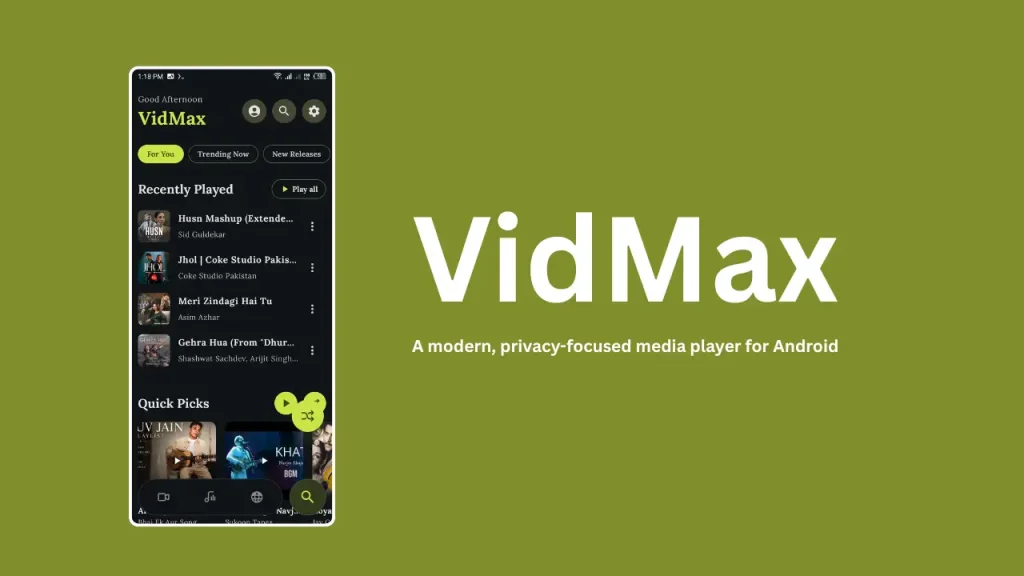
Table of Contents
What is VidMax?
VidMax is a free, open-source media player developed specifically for Android devices. Created by developer HATAKE2008, the application was built with a clear purpose: to deliver a clean, ad-free media experience capable of handling local playback alongside direct network streaming from home servers and NAS (Network Attached Storage) devices.
Unlike many commercial options, VidMax contains zero advertisements, requires no subscription, and includes no background tracking. It runs on dual playback engines Media3 and MPV which ensures smooth playback for almost every major video and audio format available today.
Features of VidMax
VidMax packs a wide array of powerful features into a simple, customizable interface:
- Dual Playback Engines: Combines Android’s modern Media3 framework with the versatile MPV engine for high video and audio compatibility.
- Network Server Streaming: Connects directly to local or remote storage using SMB, FTP, and WebDAV protocols without requiring third-party tools.
- Web Stream Support: Plays online video streams directly via HLS, DASH, SmoothStreaming, and HTTP links.
- Online Music Streaming: Includes built-in features to discover and stream online music tracks.
- 28 Offline Themes: Offers 28 pre-built visual themes, including a dedicated true-black AMOLED mode to conserve battery on OLED screens.
- Custom Typography: Supports custom TTF and OTF font imports to personalize subtitle text appearance.
- Enhanced Audio Control: Features up to 200% volume boosting for quiet audio files.
- Intuitive Controls: Includes pinch-to-zoom, swipe gestures for brightness and volume adjustments, audio track switching, and full subtitle management.
- Media Management: Organizes content with custom video playlists, a favorites system, and background audio playback support.
- In-App Update Checker: Automatically checks the official GitHub repository to keep your app up to date.
Requirement
To run VidMax smoothly on your Android device, make sure your setup meets the following basic requirements:
- Operating System: Android 7.0 (Nougat) or higher.
- Storage Space: Minimum 50 MB of available internal storage for app installation, plus extra space for local media files.
- Permissions: Storage access permission to read local video and music files; Network access permission for streaming over Wi-Fi or mobile data.
- Installation Settings: Permission to install applications from unknown sources (required when installing APK files directly).
Download
VidMax is hosted directly on GitHub, ensuring full transparency and security. You can access the main repository and download the latest release files using the official links below:
- Latest APK Download: VidMax Latest Releases
Always download the APK file directly from official repository links to ensure you receive the genuine, unmodified package.
Install
Installing VidMax on your Android device via APK takes only a few simple steps:
- Open your web browser and navigate to the VidMax Latest Releases page.
- Tap on the latest .apk file under the Assets section to begin downloading.
- Once downloaded, open your device’s Settings, go to Security (or Apps & Notifications), and enable Install Unknown Apps for your browser or file manager.
- Open your Downloads folder and tap the downloaded VidMax APK file.
- Confirm the installation by tapping Install and wait for the process to complete.
- Open VidMax from your app drawer and grant storage permissions when prompted.
How to Use
Using VidMax is straightforward whether you are playing local files or connecting to home network servers:
Playing Local Media
- Launch VidMax and grant storage permissions on the first run.
- Browse your folders to locate your video or music collection.
- Tap any video or song to start playback immediately.
- Use swipe gestures on the left side of the screen to adjust brightness, and on the right side to adjust volume. Pinch the screen to zoom in or out.
Streaming from NAS or Network Storage (SMB / FTP / WebDAV)
- Navigate to the Network or Server tab inside VidMax.
- Select your protocol type: SMB, FTP, or WebDAV.
- Enter your server’s IP address, port number, and login credentials (username and password).
- Save the connection to browse and stream movies directly from your home network storage without transferring files to your phone.
Customizing Appearance and Subtitles
- Go to the app Settings menu.
- Pick your favorite theme from the 28 available presets or switch on AMOLED mode.
- Under subtitle settings, import your preferred TTF or OTF font file to change the look of on-screen text.
Credit
VidMax is developed and maintained by HATAKE2008 (Rihad). The project is built using modern Android development technologies including Kotlin, Jetpack Compose, Material 3 design components, and MVVM architecture.
The application is released under the open-source MIT License, granting users full freedom to view, modify, and distribute the codebase. You can view the original source code and contribute to development on the VidMax GitHub Page.
Troubleshoot
If you run into issues while using VidMax, try these simple troubleshooting solutions:
- Server Connection Fails (SMB / FTP / WebDAV): Double-check that your phone is connected to the same local network as your NAS or server. Verify that the server IP address, port, and user credentials are typed correctly.
- Video Stuttering or Audio Sync Issues: Open the settings menu and switch the default video playback engine from Media3 to MPV (or vice versa), as certain video formats perform better on specific playback engines.
- Subtitles Not Displaying Properly: Ensure the subtitle file matches the video file name or import a standard TTF font in settings to resolve font rendering issues.
- APK Fails to Install: Check if you have sufficient storage space available on your device and confirm that “Install from Unknown Sources” is enabled for your file manager.
FAQs
Yes, VidMax is 100% free with no hidden fees, paid tiers, or advertisements.
Yes, VidMax is fully open source under the MIT License. Anyone can inspect its codebase on GitHub to confirm there is no malware or unwanted background code.
Yes, VidMax supports background audio playback, allowing you to listen to music or video sound tracks while navigating other apps or when your screen is turned off.
Yes, you can paste HTTP, HLS, DASH, and SmoothStreaming video links directly into VidMax for instant playback.
Conclusion
VidMax is an outstanding open-source media player for Android users seeking a clean, powerful, and ad-free viewing experience. By combining local file playback, network streaming via SMB, FTP, and WebDAV, dual rendering engines, and high theme customization, developer HATAKE2008 has delivered a versatile app for media enthusiasts.
If you found this guide helpful or have any questions about setting up VidMax on your phone, please leave a comment below!