Welcome to this comprehensive guide on HiLight Studio, an experimental utility application built to control the built-in LED hardware array on modern Pixel devices.
In this blog post, we will walk you through everything you need to know about the tool, including its core definition, key features, system requirements, download and installation steps, usage instructions, creator credits, troubleshooting tips, and frequently asked questions. Whether you are curious about customizing your device lighting or want a step-by-step setup walkthrough, this guide covers it all.
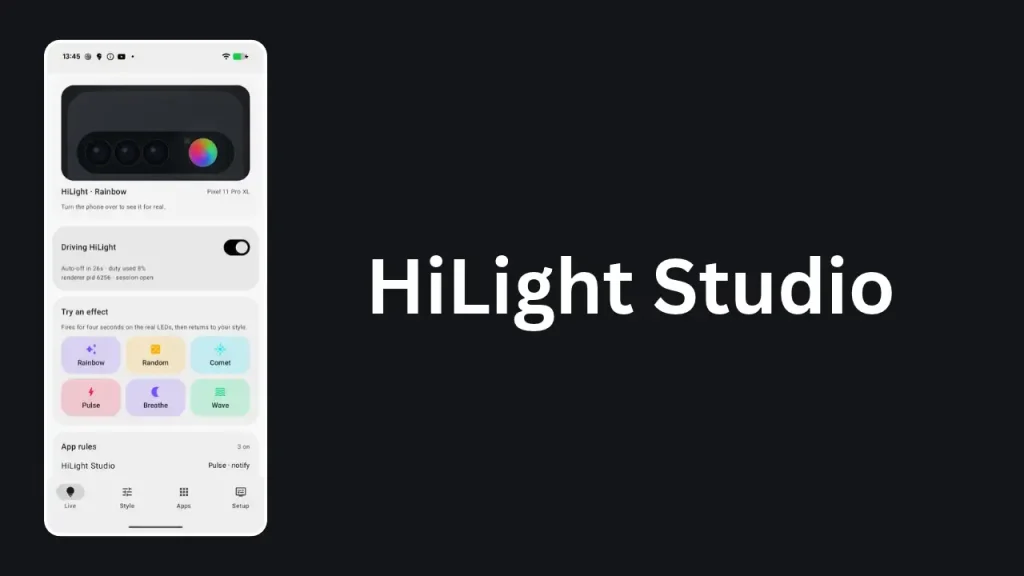
Table of Contents
What is HiLight Studio?
HiLight Studio is an experimental open-source Android application created to give users complete control over the eight-LED HiLight array found on Pixel 11 Pro series devices. Operating on Android 17, the application interacts with the system lights service to let you customize animations, notification behaviors, privacy triggers, and color presets. It is an independent project designed for enthusiasts who want deeper hardware personalization beyond stock options.
Features of HiLight Studio
This application packs a wide range of customization and control options, including:
- Solid colors and animated patterns distributed across all eight LEDs.
- Per-app rules for foreground usage and incoming notifications.
- Face-down detection rules globally or for specific notifications.
- Custom microphone and camera activity rules with customizable animations and colors.
- Per-contact rules allowing unique colors for specific chats or people.
- Preset saving with import and export capabilities.
- Wallpaper-derived color schemes and a handy Quick Settings tile.
- Quiet hours, Do Not Disturb, battery saver, and low-battery controls.
- English and language customization options.
- Automated root access support alongside Shizuku and ADB fallback methods.
- Privacy-focused diagnostics and a manual LED cleanup feature.
Requirement
To use or build HiLight Studio successfully, you need to meet specific criteria:
- Compatible hardware: Pixel 11 Pro, Pixel 11 Pro XL, or Pixel 11 Pro Fold.
- Operating system: Android 17 with API level 37.
- For building from source: JDK 21, Android SDK platform 37.0, and Android Studio or a command-line Android SDK installation.
Download
You can acquire HiLight Studio through two primary paths depending on your preference:
- Google Play Open Test: You can join the open test directly through the Play Store using the Google account configured on your supported Pixel device. No separate Google Group membership is required.
- GitHub Experimental Releases: You can download the signed APK file directly from the project’s release pages for manual installation.
Install
The installation process varies based on which distribution channel you choose:
- Play Store Method: Open the app listing on the Google Play Store using your supported Pixel device, join the open test, and hit install. The Play edition operates with its own independent settings.
- Manual APK Method: Download the signed APK to your computer. Enable USB debugging in your phone developer options, connect the phone, and execute the standard adb install command via your terminal. Note that if you previously used old debug builds, you must uninstall them first due to differing signing certificates.
How to use
Getting started with your customized LED array requires a few straightforward setup actions:
- Open the application and grant the necessary permissions, such as Notification access for alert rules and Usage access for foreground app rules.
- Turn on the Live toggle switch within the application interface.
- Head over to the Style tab to choose your preferred look, color pattern, or saved preset.
- Configure any secondary rules like quiet hours or activity triggers from the setup menu.
Credit
HiLight Studio was developed by Dhananjay Bhosale as an open-source project licensed under the MIT License. The development process incorporated modern AI coding assistance tools such as Codex, Claude Code, Cursor, and Antigravity to help structure and build the application codebase.
Troubleshoot
If you encounter unexpected behavior or hardware glitches, try these solutions:
- Stuck LEDs: If an LED remains lit after an animation ends, turn the app off, wait for the automatic cleanup pass to finish, and use the manual retry LED cleanup option in the setup tab.
- Renderer Ownership Issues: If the background helper fails to connect or report proper status, copy the fresh terminal command from the setup tab and run it again via your desktop shell to restart the helper process cleanly.
FAQs
No, HiLight Studio is an experimental, independent project and is not affiliated with or endorsed by Google.
No, the app contains zero analytics, tracking, or account systems. It only connects to the internet when you manually check for updates.
Safety limits are built directly into the renderer to protect hardware. Ambient effects and notification effects have strict time ceilings, and sustained brightness tapers off after prolonged continuous use.
Conclusion
HiLight Studio brings powerful hardware customization to supported Pixel devices, allowing deep personalization of your phone lighting through intuitive controls and flexible system permissions. If you found this guide helpful or have any questions about setting up the application on your device, please leave a comment below.