Are you looking for a way to make your phone camera cutout look modern and useful? Many Android users want quick tools without constantly pulling down the notification panel or reaching for the top of the screen.
This guide provides a complete overview of the Material Capsule application. You will learn what the app does, its core features, system requirements, how to download and install it, how to use it daily, troubleshooting tips, and answers to common questions. Read on to discover everything you need to know about transforming your phone screen layout.
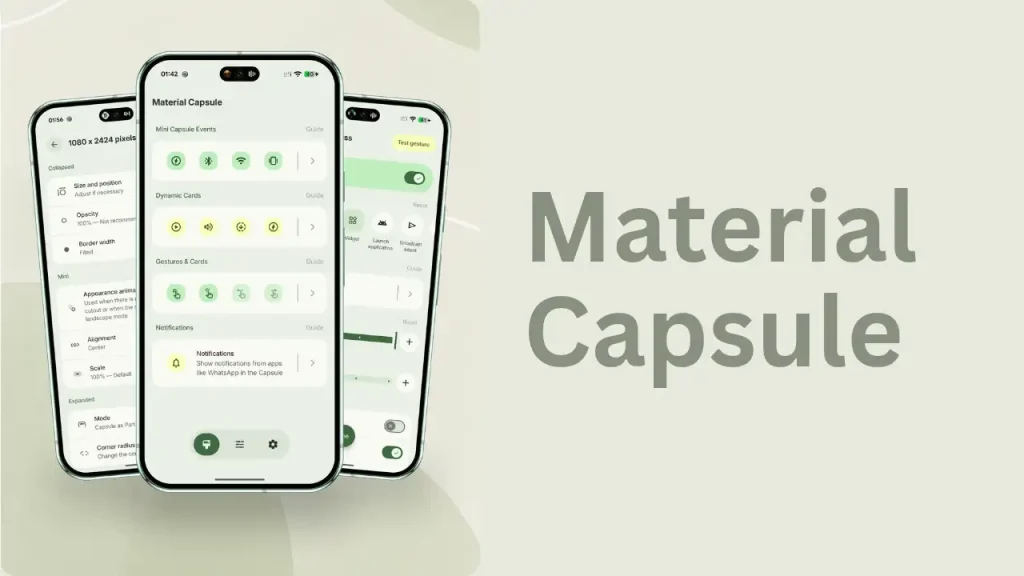
Table of Contents
What is Material Capsule?
Material Capsule is a personalization and utility app designed for Android users. Developed by Pryshedko Apps s.r.o., it turns your front camera cutout or punch hole into an interactive control center. Inspired by Material 3 Expressive and modern dynamic island designs, the app blends seamlessly into your system interface. Instead of leaving the camera space as dead or unused screen area, this application gives you quick access to media controls, shortcuts, notifications, and other useful tools right around your camera lens.
Features of Material Capsule
Material Capsule comes packed with various tools that make navigating your phone faster and smoother. Some of the notable features include:
- Media Controls: You can play, pause, skip tracks, or seek through audio and video files directly from the capsule without opening your media player.
- Quick Actions and Widgets: Pin frequently used app shortcuts, add contacts, or adjust sliders for volume, brightness, and flashlight levels.
- System Notifications: View incoming alerts and read concise previews without pulling down your entire notification shade. You can even reply to messages instantly.
- Smart Gestures: Set up custom actions like single tap, double tap, long press, and swipe gestures to launch your favorite features instantly.
- Download Monitoring: Track live download progress from browsers, messaging apps, and app stores directly from the capsule.
- Material You Theming: The overlay automatically adjusts its colors to match your current phone wallpaper for a clean aesthetic.
Requirement
Before getting the app on your device, check the basic system requirements to ensure smooth performance:
- Operating System: Android device running a compatible modern version (typically Android 12L or higher).
- Permissions: The app requires accessibility service permission to draw overlays over other apps and the system status bar, plus overlay permissions.
- Storage Space: A small amount of free storage space (usually around 20 MB or less).
- Hardware: A device with a standard front camera cutout (punch-hole) to properly align the capsule interface.
Download
To download the application legally and safely, head over to the official Google Play Store on your Android device. Search for the app in the search bar using its name. Ensure you select the official listing published by Pryshedko Apps s.r.o. Tap the download or install button to begin downloading the installation files directly to your smartphone. Avoid downloading modified APK files from unverified third-party websites to keep your device secure.
Install
Once the download process finishes, the installation starts automatically on most modern Android devices. If you downloaded it via the official app store, no extra steps are required. After installation is complete, you will see the app icon on your app drawer or home screen. Tap the icon to launch the application for the first time and prepare it for configuration.
How to use
Setting up and using Material Capsule is straightforward if you follow these steps:
- Open the app from your app drawer after installation.
- Grant the necessary permissions when prompted, including permission to draw over other apps and accessibility service access.
- Enable the capsule feature and adjust its position so that it aligns correctly with your front camera cutout.
- Choose your preferred size, shape, and layout styling.
- Add your favorite shortcuts, sliders, or tools to the capsule menu.
- Test out gestures like tap or long press to see how quickly you can access your configured controls.
Credit
This personalization application is developed and maintained by Pryshedko Apps s.r.o. The development team focuses on modern Android utility designs, bringing dynamic features and Material You customization to users worldwide. All rights to the app design, concept, and software belong entirely to its creators.
Troubleshoot
If you run into issues while using Material Capsule, try these simple troubleshooting solutions:
- Capsule Misaligned: Open the app settings and manually adjust the position, width, and height parameters to match your specific camera punch-hole location.
- Gestures Not Working: Ensure that the accessibility service permission is still enabled in your device settings, as system battery savers sometimes disable permissions.
- Animation Glitches: Restart the application or clear its cache from your device settings if the dynamic expansion feels slow or stuttering.
- Missing Notifications: Verify that notification access permissions are granted to the app so it can display incoming messages properly.
FAQs
Yes, the app is free to download and use, though it may include optional in-app purchases or features.
The app is designed to be lightweight, but keeping active animations or continuous accessibility services running can use a minimal amount of extra battery power.
The developer states that the app uses accessibility services only for drawing visual overlays and does not collect personal private data maliciously, with data encrypted in transit.
Yes, the app supports Material You dynamic coloring, which means it can automatically match your system wallpaper colors.
Conclusion
Material Capsule is a great way to breathe new life into your smartphone’s camera cutout area. By turning unused screen space into a functional control center, it saves time and makes navigation much more convenient. If you tried this app or have any questions about setting it up, please feel free to leave a comment below.