Trixie lets you run a full Debian 13 (Trixie) server or Xfce desktop inside a rooted Android device, it supports audio, Pi‑hole, and remote access but requires a rooted device and careful handling of passwords and battery health.
This post explains what Trixie.apk is, what it can do, how to download and install it, and how to use it safely on a rooted Android device.
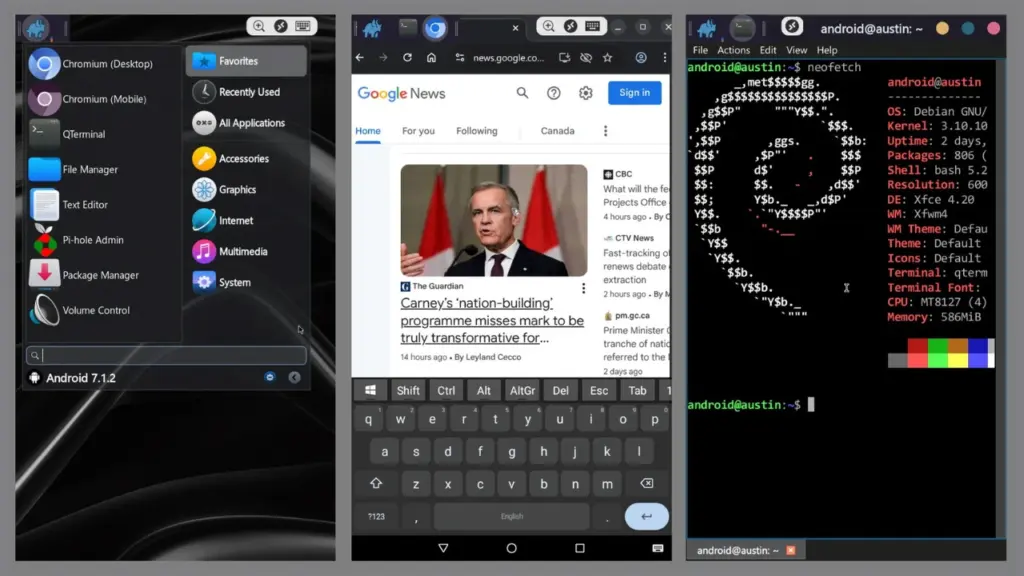
Table of Contents
What is Trixie?
Trixie is an Android application that deploys a Debian 13 (Trixie) container on rooted Android devices, providing either a server environment or an Xfce desktop. It aims to make an Android device behave like a real computer and supports both 32‑bit and 64‑bit devices from Android 5.0 onward.
Features of Trixie
- Debian 13 (Trixie) server or Xfce desktop ready to run on-device or remotely.
- Audio in/out and microphone support for apps and remote sessions.
- Preconfigured Pi‑hole with Unbound DoT for DNS ad‑blocking.
- XRDP with H.264 for performant remote desktop sessions.
- Autostart option to launch Trixie at boot.
Requirements
- Rooted Android device running Android 5.0 (Lollipop) or newer.
- Sufficient storage and RAM (running heavy apps like Android Studio needs at least 6 GB RAM).
- A healthy battery if the device will act as a long‑running server.
Download
- The official project repository and APK are hosted on GitHub (DesktopECHO/trixie.apk). Download the APK from the repository releases or clone the repo to build locally.
Install
- Enable root access and allow installs from unknown sources.
- Install trixie.apk and open the app. Grant file and root permissions when prompted.
- Tap More Options → Install and confirm. The installer will generate a one‑time password for admin/SSH/RDP access-record it immediately.
How to Use
- After deployment, the Xfce desktop appears in a few minutes. Use RDP or on‑device view to interact.
- Stop and start the instance with the app’s STOP/START controls.
- To run headless as a server, disable desktop autostart with sudo rm /etc/autogui and re-enable with sudo touch /etc/autogui.
Credit
Project maintained by DesktopECHO on GitHub; source, README, and changelog are available in the repository.
Troubleshoot
- Installer warnings (SSL/Device Access): The installer may show popups—these can be ignored; the installer continues.
- Password lost: The generated password is shown only once—if lost, redeploy or reset credentials inside the container.
- Battery risk: Replace old Li‑ion batteries before long‑term use; swollen or degraded batteries are a fire risk.
FAQs
Yes, Trixie requires a rooted device.
Yes, but 6 GB RAM or more is recommended.
Use the GitHub repository issues and README for guidance.
Conclusion
Trixie is a practical way to repurpose rooted Android devices as Debian servers or desktops, with useful features like Pi‑hole and audio support. If you try it, leave a comment below with your device model and experience so others can learn from your setup.