This Magisk module replaces Realme UI’s default icon pack with OxygenOS icons for a cleaner look; it requires a rooted BBK-family device with Magisk installed and is installed by flashing the module ZIP in Magisk then rebooting.
This post explains what the OxygenOS IconsPack Magisk module does, what you need, how to install it, and how to fix common issues. You will learn step‑by‑step instructions written in simple language so anyone familiar with rooting and Magisk can follow along.
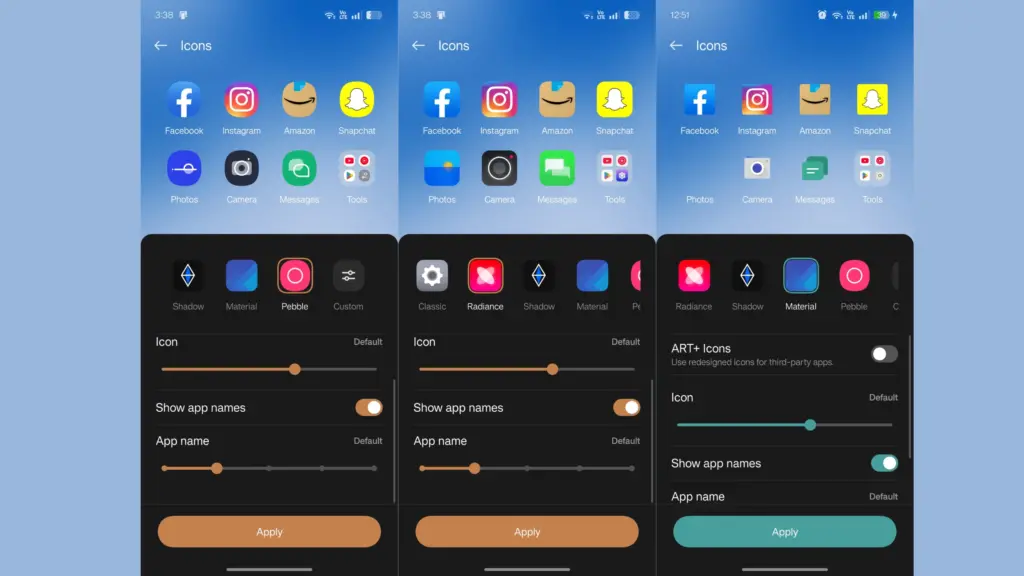
Table of Contents
What is the OxygenOS IconsPack Magisk Module
The module replaces Realme UI’s system icon pack with OxygenOS icons so your phone looks closer to OxygenOS style without changing ROMs. It works system‑wide and applies icons at boot.
Requirements
- Root access with Magisk installed on your device.
- A BBK-family device (Realme, Oppo, OnePlus lineage) running Realme UI.
- A backup of your data or a full Nandroid backup is recommended before modifying system files.
Features
- System‑wide replacement of Realme UI icons with OxygenOS icons.
- No manual file edits after flashing – module handles placement.
- Customizable: you can rebuild the module with a different icon set if you follow the repository instructions.
Download
Download the latest release from the module’s GitHub repository. The repo contains the module ZIP and a README with build notes. Always download from the official repository to avoid tampered files.
Installing
- Open Magisk Manager on your rooted device.
- Go to Modules and tap Install from storage.
- Select the downloaded module ZIP and confirm flash.
- Reboot your device.
- If icons do not appear, go to Realme UI Themes or Icon Pack settings and reapply the Classic icon pack once.
How to Use and Troubleshoot
- After reboot, check your home screen and app drawer for the new icons.
- If some icons look wrong, clear launcher cache or reapply the icon pack in settings.
- If the module causes issues, remove it from Magisk and reboot to restore the original icons. Always keep a backup.
How to Customize or Rebuild
The README explains how to extract the stock Realme icon files from a ROM, replace them with your own icons (matching original filenames), and repackage as a Magisk module. This is for advanced users only.
Credit
Module author: Parth Sancheti. Repository and instructions are on GitHub.
FAQs
It’s designed for BBK lineage; results on other OEMs are not guaranteed.
System updates may overwrite icons; you may need to reflash the module after major updates.
It modifies system resources; follow backups and proceed at your own risk.
Ending
This guide covers everything you need to install and use the OxygenOS IconsPack Magisk module on Realme UI. If you tried it, leave a comment below with your device model and any tips or issues so others can benefit.